Loading data
Preparing the interface and the latest data

Search intent analysis

Find out in a few clicks whether a page meets user expectations for a search query.

The tool analyzes intent and builds a query index to help design the structure of a website or page as logical blocks that cover the user's intent.
  • Identify user expectations behind a search query
  • Identify intent type
  • Assess how well the page covers intent
  • Identify the user's decision stage

The tool identifies common user questions that reveal the audience's actual needs.

The report provides a detailed analysis of audience needs and missing page elements, with suggestions for improving intent coverage.

Ways to cover intent:

  • Add a separate block or screen
  • Add a subsection to an existing section
  • Use a section or list
  • Add an FAQ entry
  • Omit it if it is not essential
Open the tool


Search intent analysis

Check whether a page meets user expectations for a search query

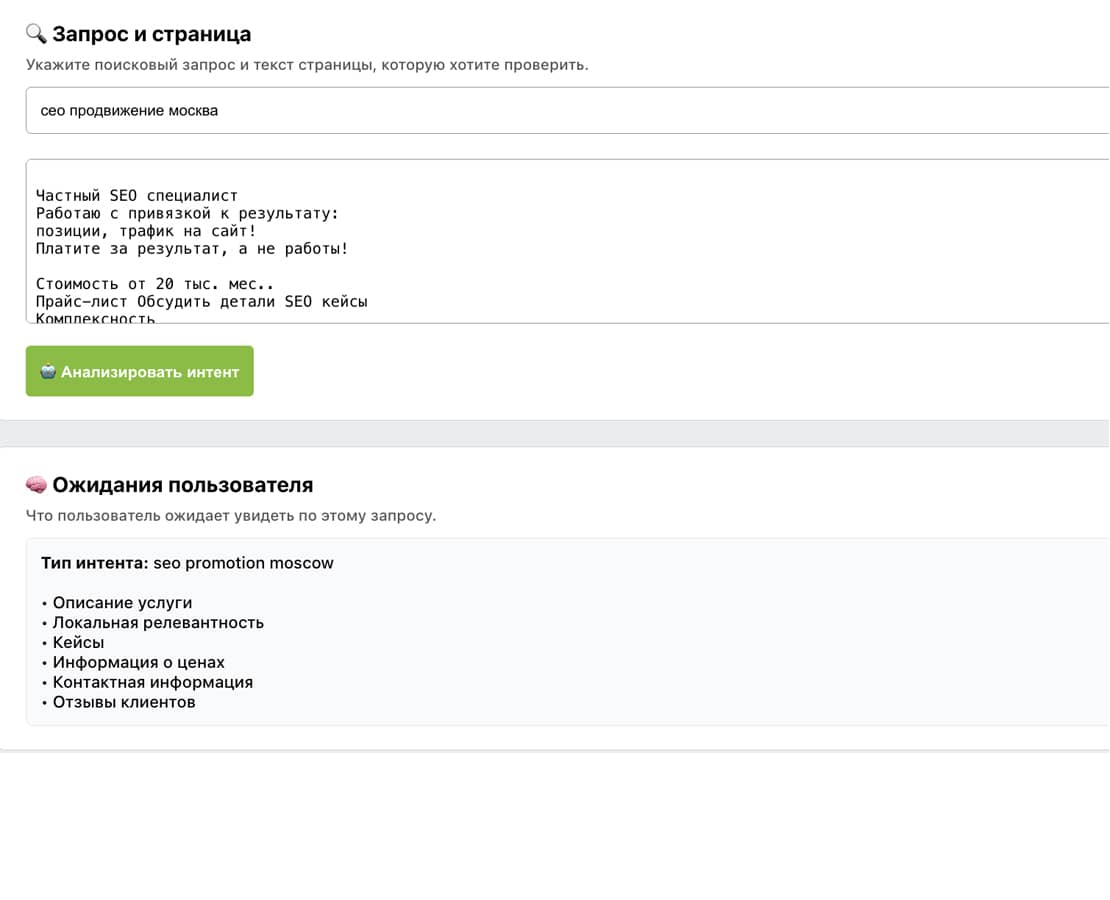
🔍 Query and page

Enter a search query and paste the plain text of the page to check.

Language for new generated content. Saved reports retain their original text.

🧠 User expectations

What users expect to find for this query.
— expectations will appear here —

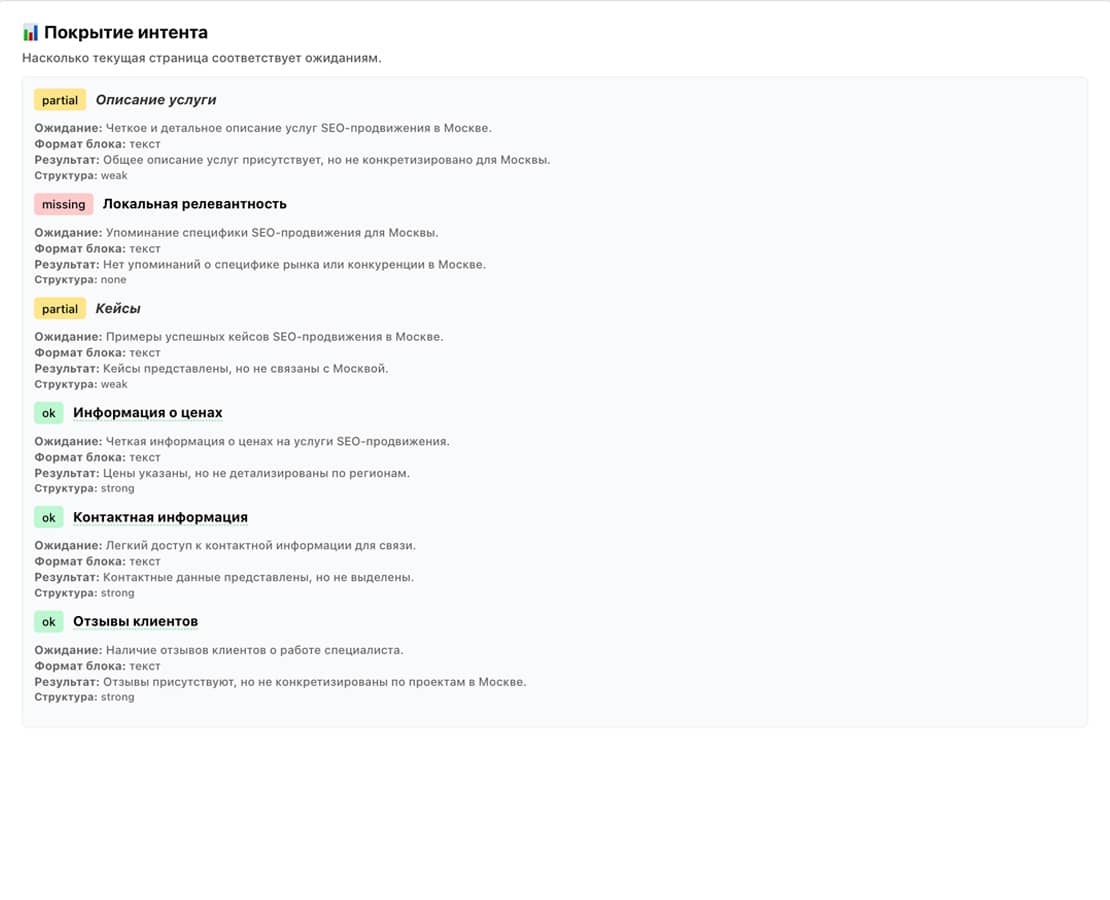
📊 Intent coverage

How well the current page meets expectations.
— analysis results will appear here —

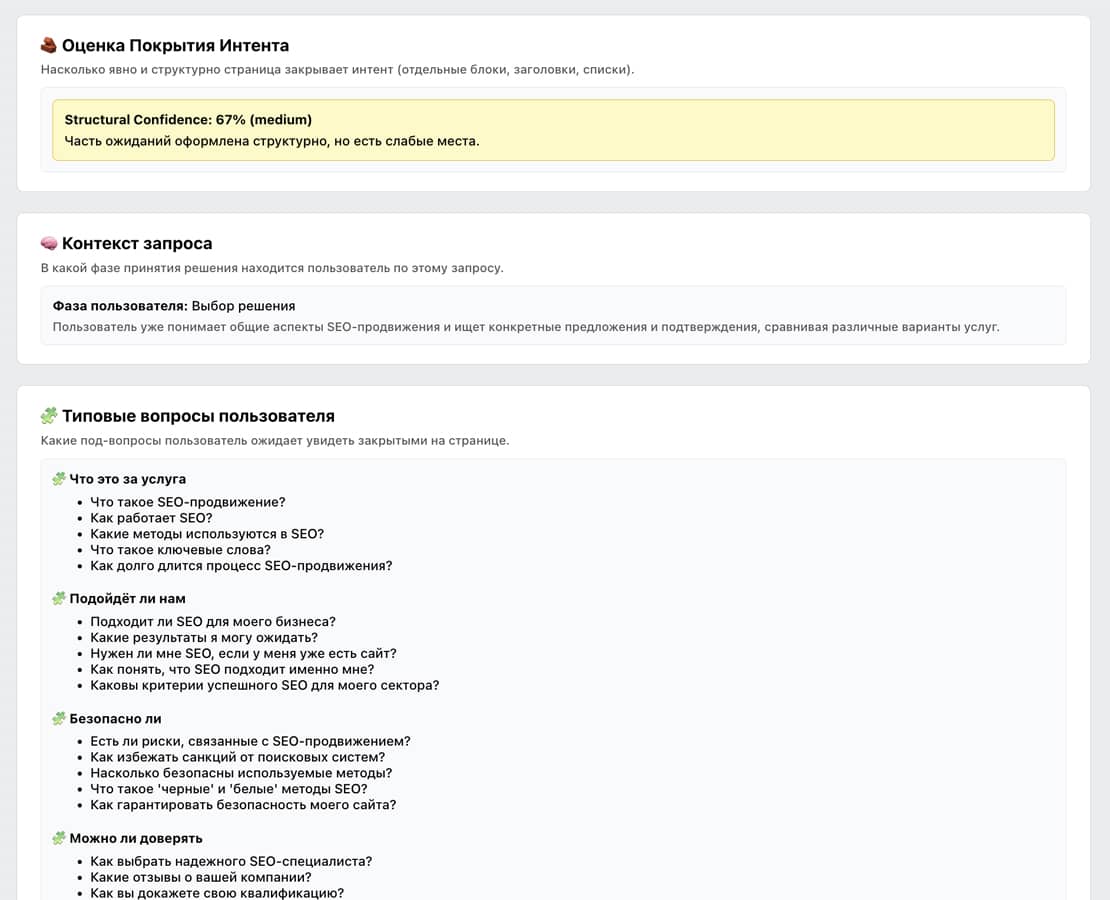
🧱 Intent coverage score

How clearly and structurally the page covers intent (separate blocks, headings and lists).
— calculating structural confidence —

🧠 Query context

The user's decision stage for this query.
— detecting —

🧩 Common user questions

Subquestions users expect the page to answer.
— questions will appear here —

➕ What to strengthen or add to the page

Specific recommendations for page structure.
— recommendations will appear here —

Changelog

Analysis updates
v1.4
  • Added detection of the user's decision stage (exploratory / decision / selection)
  • User Readiness used as context for interpreting the UX importance of subquestions
  • UX-audit is now contextual: assessment strictness depends on intent maturity
  • Subquestion importance classes (A / B / C) now adapt to the user's stage
  • Recommendations now explain mature-market expectations: brief coverage is acceptable, but omitting it reduces trust
  • The Comment column is standardized and filled for every subquestion
  • Reference questions are no longer incorrectly marked as critical
  • Improved the distinction between exploring a service and choosing a provider
  • UX-audit now better reflects actual decisions, rather than just checking for text
v1.3
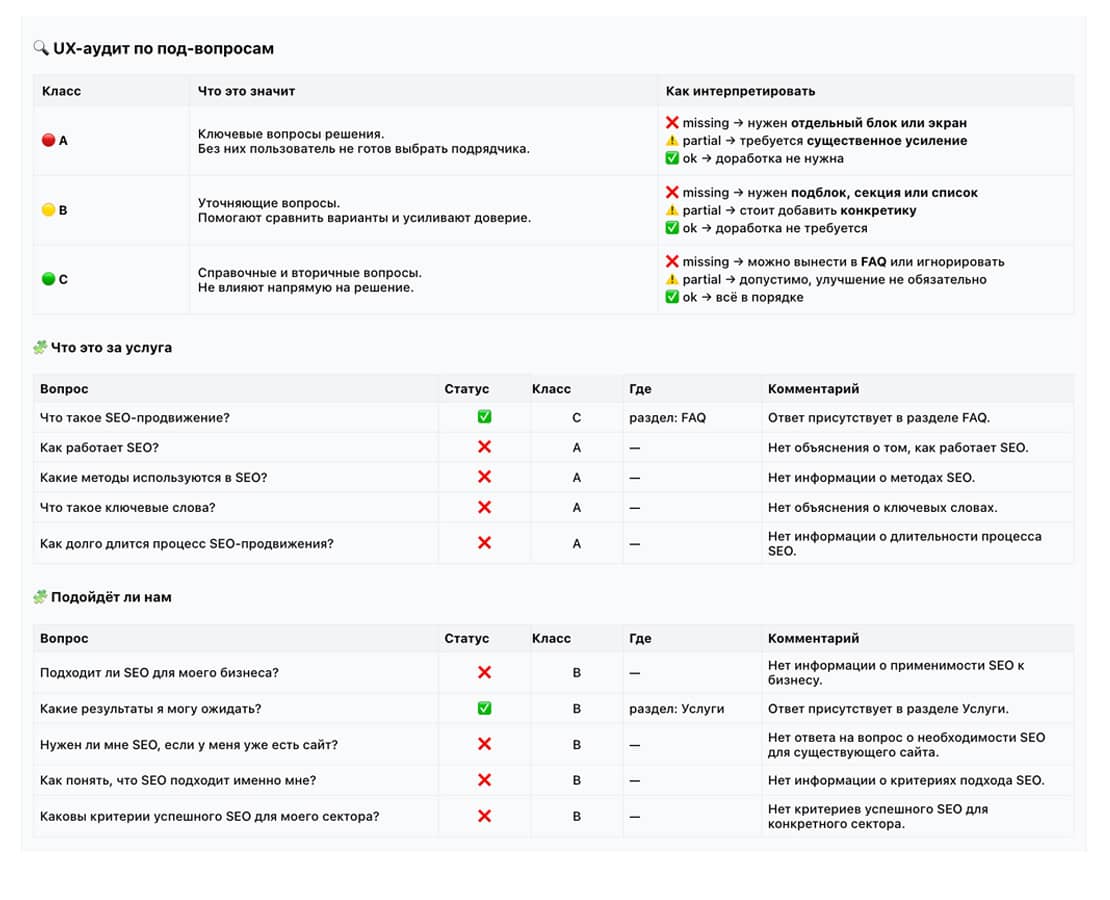
  • Added common decision scenarios (What / Fit / Safety / Trust / Price / Risk)
  • Added generation of common user subquestions for each scenario
  • Added page UX auditing for every user subquestion
  • Added checks for actual coverage of subquestions (ok / partial / missing)
  • Answers are linked to their location on the page, or null when not found
  • Subquestions are classified by priority (A / B / C)
  • Added UX audit tables with a row-by-row analysis of user expectations
  • Recommendations on what to improve or add now use the UX audit as well as page blocks
  • Removed false reports of full intent coverage when subquestions remain unanswered
v1.2
  • Added display of the expected block format
  • Expanded the explanation of each block's analysis results
v1.1
  • Detailed user intent analysis
  • Moved from formal blocks to user expectations
  • More accurate assessment of page structural confidence
v1.0
  • Identify basic user expectations for a query
  • Focus on common semantic page blocks
  • Assess the presence and structure of blocks

Frequently asked questions

Answers about preparing your data, results and tool limitations.

What is search intent analysis and how does it assess a page?

Intent analysis checks whether a page answers the task behind a search query. A visitor may want instructions, compare options, check prices or choose a provider. Sharing the same topic does not necessarily mean the page meets that need.

Enter the query and the main page text. Review the expected questions, their importance and the evidence for each assessment. Turn verified gaps into useful explanations, conditions or sections; disregard suggestions that do not fit your offering. The score is an editorial assessment, not a search-engine ranking forecast.

How does intent coverage differ from keyword presence?

Mentioning a phrase does not mean the page answers the visitor’s question. A service page can contain the service name while omitting how to order or what is included.

Look for substantive answers where readers make decisions. Prices, scope, timing and limitations need explanations based on actual business terms, rather than repeated keywords or menu labels.

What do question classes A, B and C mean?

Classes describe importance for the decision, rather than writing quality. A covers essential decision questions, B covers details useful for comparison, and C covers reference information.

Importance depends on the audience and page purpose. Start with important unanswered questions. A high-priority question that is already answered does not need another paragraph repeating the answer.

How should I prepare text so navigation does not distort the check?

Supply the main page content with meaningful headings and explanations. Large navigation menus, footers and repeated service lists can create a misleading impression of coverage.

Keep relevant price tables, process details and conditions, even when they are not ordinary paragraphs. Include important answers from tabs. Read the prepared text as a standalone page before analyzing it.

Should every report question become a separate section?

No. One useful section can answer several related questions. Secondary clarifications may work better in an FAQ.

Match recommendations to the current structure, combine overlapping topics and omit irrelevant questions. Avoid making the page harder to read by adding a separate heading for every criterion.

Does the result predict a search ranking?

No. Intent analysis checks how content addresses a user task. It does not consider every ranking factor or guarantee a search position.

Treat recommendations as editorial hypotheses. Implement changes supported by the source, compare page versions and separately observe rankings, enquiries and visitor behavior over comparable periods.

Start using AI SEO Expert Tools

Create expert content faster and analyze SEO content in greater depth.
Get 30 trial credits when you register.

🔐 Sign in to your account

Sign in to use this tool.

⛔ Your trial has ended

Your Basic trial plan has ended.

Access to tools is restricted until you renew or change your plan.

🚀 No credits remaining

You have used all your available credits.

⚠️ Check your information

Unable to complete the action.

Channel
Group
Support chat